

Close Menu
    Facebook X (Twitter) Instagram
    Facebook X (Twitter) LinkedIn Instagram YouTube TikTok
    • About
    • Contact
    • Privacy Policy
    • DMCA / Copyright Disclaimer
    • Amazon Disclaimer
    • Terms and Conditions
    VarietyEntertainmentNews.com
    • Home
    • Film
    • Television
    • Box Office
    • Reality TV
    • Music
    • Horror
    • Books
    • Technology
    • Popular Music Videos
    • Cover Story
    • Contact
      • About
    VarietyEntertainmentNews.com
    You are at:Home»Technology»How To Set Up HDMI-CEC On Your Samsung TV
    Technology

    How To Set Up HDMI-CEC On Your Samsung TV

    AdminBy AdminSeptember 13, 2026
    Facebook Twitter Pinterest LinkedIn Tumblr Email
    How To Set Up HDMI-CEC On Your Samsung TV


    HDMI-CEC makes all the devices connected to your Samsung TV work together more efficiently, with a few quirks to know.


    Person switching on a Samsung TV with the remote.
    Novikov Aleksey/Shutterstock

    Disable just one setting on your Samsung TV, and it can suddenly feel a lot less smart. Turning on your game console will no longer wake the display, your soundbar won’t respond to the TV remote, and changing inputs becomes a game of finding the last remote you left between the couch cushions. Much of this behavior is tied to Anynet+, which is Samsung’s name for a feature call HDMI-CEC.

    HDMI-CEC (Consumer Electronics Control) lets compatible devices send control signals over HDMI. This means your Samsung remote can control another device (like your soundbar), while turning on a streaming box will automatically turn on the TV and switch it to the appropriate input. HDMI still carries audio and video; CEC is just one feature that operates over it.

    Most Samsung smart TVs made after 2008 support this functionality. Anynet+ is usually activated by default on newer Samsung TVs, so you might not have noticed it. It’s also easy to turn off by mistake while exploring the Settings menu. 

    How to make sure HDMI-CEC is enabled on a Samsung TV
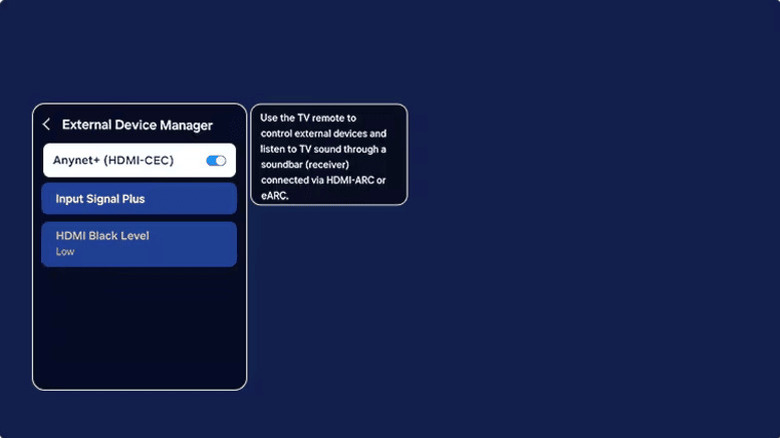

    Screenshot of the Samsung TV settings menu where you enable Anynet+.
    Samsung

    For newer Samsung TVs, press the Home button on your remote, then go to Settings > All Settings > Connection > External Device Manager. Make sure Anynet+ (HDMI-CEC) is turned on. If your TV doesn’t have a Connection menu, look under Settings > General > External Device Manager. Samsung has moved this setting across models over the years, so it might be in another location. In case you still can’t find it, check the TV’s manual or support page.

    That’s the entire TV-side setup, but what’s on the other end of the HDMI cable must cooperate as well. The connected device needs to support HDMI-CEC and, if it has its own CEC setting, that must be on. Unsurprisingly, manufacturers couldn’t agree on what to call this “standardized” feature, so you’ll see different names. LG uses SIMPLINK, Sony uses BRAVIA Sync or Control for HDMI and consoles or streaming boxes may give it yet another name. For instance, on PS5, the option is under Settings > System > HDMI > Enable HDMI Device Link.

    For CEC to work properly, the connected device must be on or in standby mode. Samsung says it can take up to two minutes to establish the initial “handshake.” Once this is done, you should be able to control the connected device with your TV remote and take advantage of automatic input switching. Turning a compatible device off (or putting it into sleep mode) will do the same for your TV.

    Should you leave HDMI-CEC turned on?


    An HDMI cable plugged into the back of a TV, alongside various other ports.
    Mulad Images/Shutterstock

    Usually, yes. HDMI-CEC makes a collection of devices act more like a single entertainment system, reducing the number of remotes and manual input switching you need. A console can turn on the TV, a compatible soundbar can power on or off with it, and your Samsung remote can control supported playback or volume functions.

    That convenience can sometimes be the issue, though. Samsung says by default, its TVs switch to an HDMI source when the connected device reports that it has turned on. Because of this, a faulty or unexpected CEC command can cause unwanted input changes. HDMI-CEC is worth checking if your TV turns on by itself, keeps switching to another HDMI device or suddenly stops controlling another unit. First, ensure CEC is enabled on both devices. Then reseat or replace the HDMI cable, restart the hardware and install available firmware updates. 

    You might also want to disable the feature for any devices where unwanted shutdowns pose a problem, like accidentally putting your game console to sleep while in a ranked match. Compatibility isn’t 100 percent consistent between manufacturers, so two products that support HDMI-CEC may not support every command in the same way. There are also device limitations, though you’ll likely need an HDMI switch before you hit these. Anynet+ can control up to 12 compatible devices, including up to three of the same type, but only one home theater system. 

    There’s one important caveat if you’re using a soundbar or receiver. HDMI eARC can only work if Anynet+ is enabled, so disabling CEC to fix an annoying input-switching issue may leave you soon troubleshooting a completely different audio problem.


    Original Source Link

    Share. Facebook Twitter LinkedIn Email Telegram WhatsApp

    Related Posts

    What Is MSI Mode On Windows PCs And Does It Speed Up Your GPU?

    Try These 3 iOS 27 Safari Settings to Get More Out of Apple’s Browser

    10 Best Standing Desks Worth Buying in 2026

    How Google Maps Knows When A Business Is Packed

    The 9 Best TV Shows to Stream This Month (September 2026)

    Upgraded In All The Right Places

    Recent Posts
    September 14, 2026

    Dead City Season 3 Episode 8 Review: Maggie and Negan Finally Find Their New Normal

    September 14, 2026

    Justin Timberlake & Camila Cabello’s $210M Comedy & More Peacock Releases This Week

    September 14, 2026

    Chief Keef Postpones First Chicago Show in Over a Decade

    September 14, 2026

    Try These 3 iOS 27 Safari Settings to Get More Out of Apple’s Browser

    September 14, 2026

    LOVE FROM AFAR | Kirkus Reviews

    September 14, 2026

    ‘Buddy’ Scaring Up Cash & Tattoos, ‘Runner’ Dashes Out As Indies Crowd Top 10 – Specialty Box Office 

    September 14, 2026

    Beyonce’s Daughters Blue Ivy & Rumi Soak up Paris Before Dad Jay-Z’s Show

    Categories
    • Books (2,339)
    • Box Office (1,735)
    • Cover Story (43)
    • Featured (50)
    • Film (2,373)
    • Horror (2,359)
    • Music (2,426)
    • Politics (29)
    • Popular Music Videos (1,781)
    • Reality TV (1,807)
    • Technology (2,361)
    • Television (2,416)
    • Uncategorized (2)
    Archives
    Useful Links
    • About
    • Contact
    • Privacy Policy
    • DMCA / Copyright Disclaimer
    • Amazon Disclaimer
    • Terms and Conditions
    Categories
    • Books (2,339)
    • Box Office (1,735)
    • Cover Story (43)
    • Featured (50)
    • Film (2,373)
    • Horror (2,359)
    • Music (2,426)
    • Politics (29)
    • Popular Music Videos (1,781)
    • Reality TV (1,807)
    • Technology (2,361)
    • Television (2,416)
    • Uncategorized (2)
    Recent Posts
    • Shudder’s ‘V.H.S. Mixtape’ Coming October 9th featuring Mike Ferguson, Jihad Brent, Erin Griff, and Gwar
    • Scott Speedman Reveals How Victor’s Murder Affects R.J. and Emi’s Relationship (Exclusive)
    • Pulp: What Do You Do for an Encore? review – a…
    • Mastodon to Tour with Baroness’ John Baizley in Their Lineup
    • What Is MSI Mode On Windows PCs And Does It Speed Up Your GPU?
    • TELL ME ABOUT YOUR APPLE FESTIVAL
    • ‘Practical Magic 2’ Opens to $46M Global Box Office
    • Kathryn Dennis & Thomas Ravenel’s Court War Reaches S.C. Supreme Court
    © 2026 Variety Entertainment News. All rights reserved. All articles, images, product names, logos, and brands are property of their respective owners. All company, product and service names used in this website are for identification purposes only. Use of these names, logos, and brands does not imply endorsement unless specified. By using this site, you agree to the Terms & Conditions and Privacy Policy.

    Type above and press Enter to search. Press Esc to cancel.

    We use cookies on our website to give you the most relevant experience by remembering your preferences and repeat visits. By clicking “Accept All”, you consent to the use of ALL the cookies. However, you may visit "Cookie Settings" to provide a controlled consent.
    Cookie SettingsAccept All
    Manage consent

    Privacy Overview

    This website uses cookies to improve your experience while you navigate through the website. Out of these, the cookies that are categorized as necessary are stored on your browser as they are essential for the working of basic functionalities of the website. We also use third-party cookies that help us analyze and understand how you use this website. These cookies will be stored in your browser only with your consent. You also have the option to opt-out of these cookies. But opting out of some of these cookies may affect your browsing experience.
    Necessary
    Always Enabled
    Necessary cookies are absolutely essential for the website to function properly. These cookies ensure basic functionalities and security features of the website, anonymously.
    CookieDurationDescription
    cookielawinfo-checkbox-analytics11 monthsThis cookie is set by GDPR Cookie Consent plugin. The cookie is used to store the user consent for the cookies in the category "Analytics".
    cookielawinfo-checkbox-functional11 monthsThe cookie is set by GDPR cookie consent to record the user consent for the cookies in the category "Functional".
    cookielawinfo-checkbox-necessary11 monthsThis cookie is set by GDPR Cookie Consent plugin. The cookies is used to store the user consent for the cookies in the category "Necessary".
    cookielawinfo-checkbox-others11 monthsThis cookie is set by GDPR Cookie Consent plugin. The cookie is used to store the user consent for the cookies in the category "Other.
    cookielawinfo-checkbox-performance11 monthsThis cookie is set by GDPR Cookie Consent plugin. The cookie is used to store the user consent for the cookies in the category "Performance".
    viewed_cookie_policy11 monthsThe cookie is set by the GDPR Cookie Consent plugin and is used to store whether or not user has consented to the use of cookies. It does not store any personal data.
    Functional
    Functional cookies help to perform certain functionalities like sharing the content of the website on social media platforms, collect feedbacks, and other third-party features.
    Performance
    Performance cookies are used to understand and analyze the key performance indexes of the website which helps in delivering a better user experience for the visitors.
    Analytics
    Analytical cookies are used to understand how visitors interact with the website. These cookies help provide information on metrics the number of visitors, bounce rate, traffic source, etc.
    Advertisement
    Advertisement cookies are used to provide visitors with relevant ads and marketing campaigns. These cookies track visitors across websites and collect information to provide customized ads.
    Others
    Other uncategorized cookies are those that are being analyzed and have not been classified into a category as yet.
    SAVE & ACCEPT